
Home Blog

De-Mystifying Healthcare Apps: A “SMART on FHIR” Starter Kit for Developers

By Hisham Alrashdan — Healthcare Integration Engineer

Building a healthcare app is not like building a standard web app. You cannot just “login with email” and query a database. You must handle strictly regulated patient data, integrate with massive Electronic Health Record (EHR) systems (like Epic or Cerner), and strictly follow security protocols.

This high barrier to entry discourages many developers. I built the SMART on FHIR Starter Kit to lower that barrier.

This open-source repository is a small, working example for learning and demos. It handles the SMART sign-in (OAuth2) and the first data reads. It is not production software.

The Problem: The “Auth” Wall

The biggest hurdle in healthcare app development is the Launch Sequence.

To securely connect an app to a hospital system, you must use the SMART App Launch Framework. This involves a complex dance of redirects, handshakes, and token exchanges:

  1. The app launches from inside the EHR (or standalone).
  2. It redirects the user to the hospital’s Authorization Server.
  3. The user logs in (as a doctor or patient).
  4. The app receives an authorization code.
  5. The app exchanges that code for an Access Token.
  6. Finally, the app can fetch data (e.g., GET /Patient/123).

Coding this from scratch for every project is error-prone and tedious. A single mistake in the OAuth2 scope handling can break the entire integration.

The Solution: A Pre-Configured SMART Starter Kit

My SMART FHIR Starter Kit acts as a “batteries-included” foundation. It uses the standard SMART library, fhirclient.js, in plain HTML and JavaScript. There is no build step.

Key Features

  • Zero-Config Auth Flow: Handles the entire OAuth2 “Code Flow” out of the box.
  • Patient Context Ready: Automatically detects the current patient ID from the EHR session and fetches their demographics.
  • Sandbox Compatible: Pre-configured to work with the standard SMART Health IT Sandbox for easy testing.
  • Simple stack: plain HTML and JavaScript with fhirclient.js 2.6.3.

Technical Implementation

The kit is designed to abstract away the protocol complexity.

1. The Launch (launch.html) When a doctor clicks your app icon in the EHR, this file triggers the FHIR.oauth2.authorize() sequence, requesting the scopes launch openid fhirUser patient/*.read. patient/*.read means: read the data of the patient in context. In a standalone launch the app asks for launch/patient instead, so the user can pick a patient.

2. The Handshake (index.html). After sign-in, index.html calls FHIR.oauth2.ready(). fhirclient swaps the code for an access token. Then the app reads the patient in context:

const client = await FHIR.oauth2.ready();
const patientId = client.patient.id;
const patient = await client.request(`Patient/${encodeURIComponent(patientId)}`);

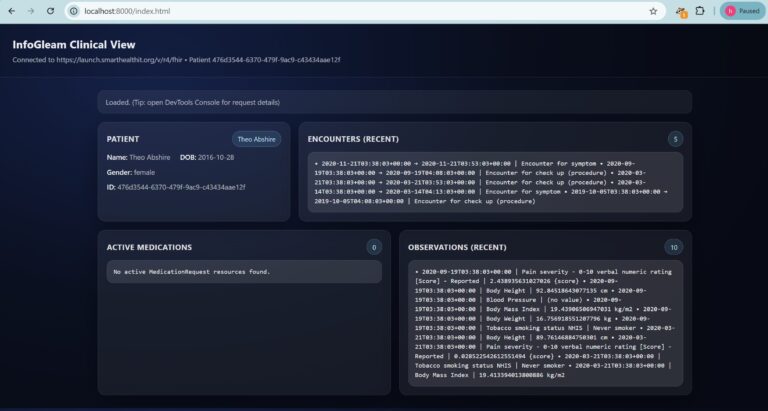
3. The UI Layer The dashboard shows the patient (name, birth date, gender, ID), the 5 latest encounters, active medications and the 10 latest observations. All server text is shown with textContent, so text from a FHIR server cannot run script in the page.

Why This Matters

This starter kit is more than just code; it is an educational tool. It bridges the gap for standard web developers trying to enter the health-tech space. By stripping away the complexity of the initial connection, it empowers engineers to prototype solutions—like a Cardiac Risk Calculator or a Diabetes Tracker—in hours instead of weeks.

To try it, clone the repository, run npm run start:smart-app (it needs Python 3), and open http://localhost:8000/index.html. For a full SMART launch, open https://launch.smarthealthit.org/ and use http://localhost:8000/launch.html as the app launch URL.

The kit also has an HL7 v2 channel for Open Integration Engine (OIE). Each message must have a message ID (MSH-10) and a patient ID (PID-3). The channel maps ADT to a FHIR Patient and ORU lab results to FHIR Observations. A message with a missing field gets an error ACK (AE). It was tested on OIE 4.7.0.

Conclusion

This project demonstrates that building secure healthcare applications doesn’t have to be an insurmountable challenge. By abstracting the complexities of OAuth2 handshakes and SMART launch contexts into a reusable boilerplate, we can lower the barrier to entry for digital health innovation.

The kit shows that plain web pages can use the standard SMART sign-in to read EHR data. It was tested with public test servers only. A real app still needs its own security and compliance review.

You can view the full source code, try the sandbox launch, and read the setup guide and the known limits on my GitHub.
Bridging the Healthcare Divide: Building an HL7-to-FHIR Transformation Pipeline with Mirth Connect & Node.js

By Hisham Alrashdan — Healthcare Integration Engineer

In the world of healthcare technology, we are often caught between two eras. On one side, we have legacy Electronic Medical Records (EMR) systems speaking HL7 v2.5—a pipe-delimited text standard from the 1980s. On the other, we have modern cloud platforms, analytics tools, and mobile apps expecting FHIR R4—a robust, RESTful JSON standard.

Bridging this gap usually requires expensive middleware or months of manual integration.

I built InfoGleam Health as a Proof of Concept (PoC) to demonstrate how we can solve this interoperability challenge using open-source tools, modern DevOps practices, and a microservices architecture.

Note: Mirth Connect was open source up to version 4.5.2. From version 4.6 (March 2025) it is commercial. This project runs on Open Integration Engine (OIE), the open-source continuation of Mirth Connect. The same channel also works on Mirth Connect 4.5.2.

The Problem: The “Tower of Babel” in Hospitals

The core engineering challenge in healthcare interoperability is data normalization.

  • Legacy Systems emit streams of cryptic text (HL7) via MLLP (a raw TCP/IP protocol).
  • Modern Systems require structured JSON resources via HTTP/S.

Without a bridge, these systems cannot communicate. My goal was to create a Reference Implementation that automates this translation in real-time, is easy to deploy, and separates the parsing logic from the business logic.

The Solution: InfoGleam Health

InfoGleam Health is a lightweight, containerized pipeline that ingests HL7 v2.5 messages and outputs a FHIR R4 Patient resource.

The architecture is designed around “Separation of Concerns.” Rather than building a monolithic application, I decoupled the message transport from the transformation logic.

High-Level Architecture

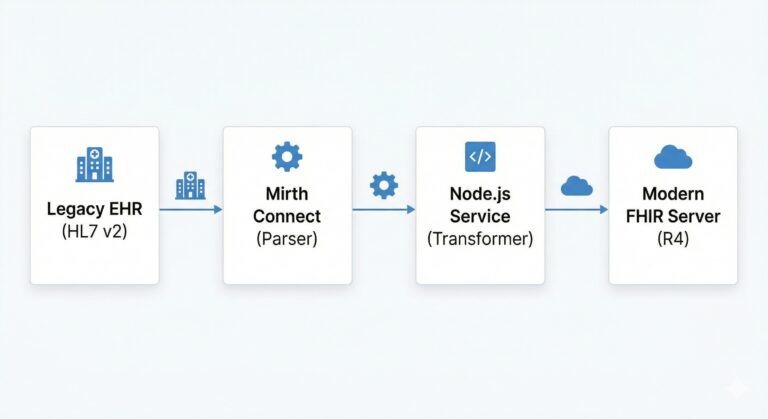
The system runs on Docker Compose and consists of three distinct layers:

  1. Ingestion layer (OIE or Mirth Connect): the integration engine. It listens for HL7 messages over MLLP and parses them.
  2. Transformation Layer (Node.js/Express): A microservice that handles the complex logic of mapping raw data into the FHIR schema.
  3. Orchestration (Docker): A unified environment that allows the entire stack to spin up with a single command.

Why I Decided to Separate Mirth and Node.js

A common approach is to do everything inside Mirth Connect using its internal JavaScript engine. However, for this project, I made an architectural decision to offload the heavy transformation logic to a dedicated Node.js service.

My reasoning was twofold:

  1. Modern tooling: Node.js has npm and standard test tools. Code inside the engine runs in its Rhino JavaScript engine, which is hard to test outside the engine.
  2. Testability: all mapping rules are in one Node.js file. The repo has 37 automated tests.

Technical Implementation: The Data Flow

Here is how the system processes a patient admission event (ADT^A01) in real-time.

Step 1: Ingestion

The hospital system sends a raw HL7 string. To the untrained eye, it looks like noise:

MSH|^~\&|HOSPITAL_SYSTEM|INFOGLEAM_REF|MIRTH|FHIR_SERVICE|20260112093045||ADT^A01|MSG00001|P|2.5
PID|1||TEST000001^^^INFOGLEAM^MR||PATIENT^TEST^A||19700101|U|||100 TEST STREET^^TESTVILLE^TS^00000^USA||(555)0100|||S||ACC000001|

Step 2: Parsing & JSON Conversion

The engine receives this message over MLLP on port 6661. A filter lets only patient events pass (ADT A01, A04, A05, A08, A28 and A31). A short JavaScript step copies the PID fields (ID, name, birth date, gender, address and phone) into JSON and posts it to the Node.js service.

Step 3: FHIR Normalization (The Heavy Lifting)

The Node.js service receives the raw JSON and applies the FHIR R4 schema rules. This is where the engineering complexity lies—handling date formats, mapping gender codes, and structuring arrays.

// Real output from the test run on 30 Oct 2026. There is no id, because the app does not store the Patient.
{
  "resourceType": "Patient",
  "identifier": [
    {
      "type": {
        "coding": [
          {
            "system": "http://terminology.hl7.org/CodeSystem/v2-0203",
            "code": "MR",
            "display": "Medical record number"
          }
        ]
      },
      "system": "https://example.org/fhir/mrn",
      "value": "TEST000001",
      "assigner": {
        "display": "INFOGLEAM"
      }
    }
  ],
  "name": [
    {
      "family": "PATIENT",
      "given": [
        "TEST",
        "A"
      ]
    }
  ],
  "telecom": [
    {
      "system": "phone",
      "value": "(555)0100",
      "use": "home"
    }
  ],
  "gender": "unknown",
  "birthDate": "1970-01-01",
  "address": [
    {
      "line": [
        "100 TEST STREET"
      ],
      "city": "TESTVILLE",
      "state": "TS",
      "postalCode": "00000",
      "country": "USA"
    }
  ]
}

Developer Experience (DX)

One of my primary goals was usability. Integration engines are notoriously difficult to set up. I used Docker, so any developer can start the project with a few commands. You need Docker and Node.js 22.

git clone https://github.com/Hisham-InfoGleam/infogleam-health-poc
cd infogleam-health-poc
npm start   # starts OIE and the FHIR app in Docker
# import and deploy mirth-config/adt_to_fhir_channel.xml (see the README)
npm run test:send-hl7   # sends a test ADT^A01, expects AA

Disclaimer: From Demo to Production

It is important to note that InfoGleam Health is a Proof of Concept. While the logic is sound, a production environment requires strict adherence to HIPAA/GDPR regulations. To take this from “Demo” to “Live,” the following would be required:

  • Security: Implementing TLS 1.3 for all transport layers and OAuth2 for API authorization.
  • Persistence: Replacing the in-memory processing with a durable message queue (like RabbitMQ) to ensure no data is lost during a crash.
  • Auditing: Comprehensive logging of every data access event.

Conclusion

This project served as a deep dive into the complexities of healthcare interoperability. It demonstrates that by combining an integration engine such as OIE or Mirth Connect with modern microservices patterns in Node.js, we can build systems that are robust, testable, and ready for the future of digital health.

You can view the full source code, run the simulation, and check out the documentation on my GitHub.